Showing posts with label ebooks. Show all posts

2011-12-19

No Australians Allowed: the joys of ebook-buying online

(originally published on Oz Ebooks)

No Australians Allowed

The joys of ebook-buying online


(Thankyou to Darryl for his invitation to post on Oz Ebooks!)

As anyone reading my previous (and possibly acerbic) posts and comments will know, I get pretty steamed about geographic limitations on buying ebooks.
They're like a weird DVD-zoning system which assumes Australians can't read.
We're half the U.K. book-buying market, despite our much smaller population, so it should be evident to even the most confused publisher that not only can we read, but that we read a lot.
We're good customers.

Good customers get...

...shafted. In the days of loyalty programs and reward points, this comes as a bit of a shock. It would shock an accountant even more. "What, you have all these customers who want to buy your ebooks, and you won't let them? What are you, an idiot?"
It's a good question. For those of you not yet familiar with the geolims saga, I'm going to explain it briefly before going on. Geolims veterans may skip the next section.

Barbed Wire on the Internet

Up until a couple of years ago, you could buy ebooks from anywhere online. The Internet is a worldwide network, and we've all found that amazingly convenient when it comes to finding the things we want to buy or know. The Internet has removed the national boundaries which kept us all apart.
Apparently, this freedom to communicate has made corporations/governments nervous. They have less control over what we see and do. So they try to impose various kinds of censorship. In Australia, for example, our government is still threatening to censor and monitor everything we do online.
Article 19 of the Universal Declaration of Human Rights says:
"Everyone has the right to freedom of opinion and expression; this right includes freedom to hold opinions without interference and to seek, receive and impart information and ideas through any media and regardless of frontiers."

so Internet censorship specifically violates our rights.
It's also massively inconvenient. Nowadays, can you buy electronic media online? Or is it "limited" by "geographic location"?
In effect, the media "industry" decided to put up barbed-wire fences on the Internet. They divided us back into different countries again. Music, movies, TV shows, audio and ebooks are "available" (or not) according to where you live.
For ebooks, this means Australians are "not allowed" to buy most of the ebooks produced by the "Big 6" or "Agency" publishers. These companies own nearly all of the popular authors. So how do you get the titles you want?

Dodging the Prickles

I'd really like to see a good guide for navigating the ebook-buying maze if you happen to be one of the majority of English-speakers who don't live in the U.S. Meanwhile, here's mine. ;)

1. Use an ebook search engine

I use Inkmesh. You'll notice that its home page has links to a range of free ebooks and specific genres. Plug your book title and/or author into the search field, and you get a fast and accurate result. I used to spend hours trying to find ebooks via Google: Inkmesh takes you right to the ebook retailers. You get a list of titles matching your search, and the one you want is usually at the top. Click on that, and you get a much shorter list: the retailers who are actually selling that ebook.
Inkmesh provides results for a number of the major ebook retailers, including W. H. Smith in the U.K. They told me some time ago that they would add Borders Australia. They seem willing to provide more country-specific sites for those of us locked out by the main U.S.-based publishers.

2. Watch out for geolims

Inkmesh results usually include excellent ebook sites like Fictionwise, Diesel Ebooks, BooksOnBoard and Amazon. If you live in the U.S., you can click on the link and immediately buy that book. If you don't (and especially if you live in Australia or NZ), you can save browsing time and attempted-buying time by watching out for the signs saying effectively "Not For You, Mate".
Amazon gives the best and clearest warning. Every time I curse at them for not allowing me to buy the ebook I want, I also reluctantly acknowledge that they didn't lead me on. ;) On the RHS, where I normally see the brightly-coloured "Buy with 1-click" and "Deliver to Clytie's iPhone" choices, I see the green-only box saying "This title is not available to customers from: Australia".
Fictionwise and Kobo will simply not show you a title if you aren't allowed to buy it. In some ways this is kinder (not dangling a much-wanted book in front of your nose), but it sometimes gives you the impression there isn't much there. In over two years of checking Kobo results from Inkmesh, I've never found a title I wanted to buy. I'm told Kobo has a great range, but evidently it's not so great if you live in Australia. Fictionwise has been bought out and systematically strangled by its competitor Barnes and Noble, so it's not the one-stop-ebook-shop it used to be. However, it does still have its advantages, as I mention further on.
Diesel eBooks shows an "Allowed Countries (Hover)" link in red, under the book description and Buy/Wishlist buttons. When I hopefully "hover" my mouse cursor over that link, it inevitably says "US". Before Diesel added this info, I used to get all the way to Checkout with a stack of great books, only to find I wasn't allowed to buy them. Early warnings do save us time, even if they continue to frustrate us as legitimate customers.
BooksOnBoard won't show a price for a title if you're not allowed to buy it. If you click the Buy link anyway, a popup window will tell you you're not allowed to buy that title because you live where you do.
Retailers could also play a raspberry sound as well. "Hey, April Fool! We let you think you could buy this book, but you can't. LMFAO!!!" :S

3. Shop around: there is inconsistency

Not only do geolims not make any sense from the book-selling or book-buying points of view, they can also be inconsistent. For example, a few months back HarperCollins released the first three titles of Lynsey Sands' Argeneau series. They hadn't previously been available in ebook, so followers of that series (including me) rushed to grab them. Australian readers quickly found out that we were only "allowed" to buy 2 out of the 3 titles. Huh?
As I asked HarperCollins at the time, why would three consecutive ebook titles from the same series by the same author and published simultaneously by the same publisher have different geographic limitations?
I didn't get an answer. Diesel Ebooks also contacted HarperCollins about this inconsistency, receiving the disjointed reply "We haven't turned on any of our ebooks for Australia yet". You get the impression that the publishers don't understand geolims either.
The point of this story is that I actually found different sites blocked a different title out of the three ebooks. God only knows why, but I wasn't about to question my good fortune. This meant I could buy all three titles, with a little ebook-retailer-surfing.
I keep a list of the titles I haven't been allowed to buy (especially those part-way through a series I follow), and recently I also found a single ebook site (which normally blocks me on everything) allowed me to buy not one, but several of my most-wanted titles. Again, I have no idea why that site didn't have the same geolims info as the others: I just bought the books! I've also noticed that sometimes I'm allowed to buy a book in pre-order, and get it, where it's blocked to purchase once the pre-order period is over. All this means it can be worth shopping around.

4. Use Calibre

Calibre is a free cross-platform tool for managing, cataloguing, converting and transferring ebooks. Seriously, this thing rocks. It will convert any non-DRM format, transfer to just about any device, provide a catalogue you can access from a computer or smartphone, allow you to search your catalogue, keep track of what titles/authors you have, keep track of series, import metadata (including cover images, blurb and ISBN) and apply your own tags.Before geolims were imposed, I didn't need Calibre. I bought all my ebooks from Fictionwise, which had an excellent Bookshelf with categories (including your own categories). It was really easy to keep track of which books I had, which ones I'd read (or not), which were in series etc.
After the Electronic Curtain came down, I spent way too much time not only trying to find books I was allowed to buy, but trying to keep track of which books I'd bought from where, in what format, and whether they belonged to series. My collection was all over the place. Instead of series all being in one format from one retailer, they had titles in multiple formats from different retailers. One series of seven books is in five different formats from five different retailers, requiring me to read it in five different apps on my iPhone. I couldn't go on reading some series (because none of the newer books were available to Australians), and other series had missing titles (I could buy all the books in a 9-book series except Book 5? WTF?). I couldn't keep track, and ended up buying some ebooks I already had, and missing the opportunity to buy others I wanted.
Calibre keeps track of all my ebooks now, and some of my hard-copy books (you can add an "empty" record and use it for a hard-copy book, magazine etc.). I imported all my previous ebooks into it, and I drag new ebooks into it as I buy them. Tags and series make it really easy to keep track of which books are from which retailers, which I'm missing, which I've read, which have DRM or not. So what if my ebooks are now scattered across different locations on my hard drive (Digital Editions, My Kindle Content, eReader etc.)? Calibre keeps a copy of each ebook in its own Calibre Library.
Calibre also works seamlessly with Stanza (one of the best e-readers for iPhone, iPad and iPod Touch). If you turn on the Calibre Server preference, Stanza immediately sees your Calibre library, and allows you to download titles over a wireless or wired connection. I find this quite a time-saver.
Update: if Amazon (who bought Stanza to stifle competition) breaks the app again, you can also access Calibre from Tomes and several other mobile reading apps.

5. Support your local online bookseller

For Australia, that's Borders Online. Despite the ongoing bloodletting within the company, Borders Online is likely to continue. Its costs are low, and its profits should be substantial. OK, its website still sucks (see my recent post), but by and large Borders is a viable Australian ebookstore. Every ebook in its catalogue is available to Australians. Its range is improving, and it does get titles which are otherwise blocked to us. Keep an eye on Borders, and buy ebooks there when you can.
Some local publishers (e.g. Pan Macmillan Australia) and local sites like Read Without Paper are starting to sell ebooks online, so it's also worth looking around for Australian book sites. You may pay more, but at least you may be able to buy the book. That goes literally double for iBooks (iTunes bookstore): you will pay at least twice the U.S. price, but if you can't find a title anywhere else, you might be desperate enough to pay that much.
Otherwise we're left with sites like ebooks.com, a major international ebook retailer located in Perth, Western Australia, which follows the U.S. publishing model and blocks us from most titles. It's hard to see what Australians get out of having this site in our country. Perhaps ebooks.com could start getting ebooks for Australians?

6. Try author sites, indies, self-pub and public domain

Once geolims were imposed, I spent a lot of time trying to find out WTF was going on. (There was no announcement to customers: I just couldn't buy the books I wanted anymore.) Publishers seem to be a dead end: either they don't care, or they are genuinely confused about their job. Some are both, which is a little disturbing. Authors, on the other hand, really want you to read their books. So it's definitely worth visiting author websites (and just about every author has one nowadays). Author websites often offer free stories, directly sell their backlist titles at a much better price and without DRM, and keep you informed about upcoming titles. Most importantly, every author I've contacted is shocked and upset that Australians can't buy his or her ebooks. Most have said numbly, "But I insisted on world rights for ebooks". Telling an author that you're blocked from buying his or her ebooks is a good way to raise awareness about geolims. The author complains to his or her agent, the agent complains to the publisher, and things may change. You can also contribute to the Lost Book Sales site, to advise publishers when they have lost a sale due to geolims (or ridiculously high prices, bad formatting, dreadful typos etc.).
The Big 6 aren't the only publishers of ebooks. They may have amalgamated all the well-known brand-names, but they don't necessarily have a stranglehold on authors. Due to the much lower cost of publishing ebooks, a number of independent ebook publishers exist now. Each one has its own website and ebookstore, and many of their titles are also available at Fictionwise in Multiformat (a range of non-DRM formats) for considerably less than you pay the Big 6. You can discover some new and entertaining authors from Indie (independent) epublishers. Indie publishers give you more book for your buck. ;)
Ebooks also make it easier for people to self-publish. Authors self-publish their own work: both backlist and new titles, sometimes in response to reader request. In particular, have a look at the websites of long-time professional authors J. K. Konrath and Michael Stackpole. Both have found creative ways to communicate directly with their readers, while charging much lower prices. The great part about self-published authors is that you are directly paying them. Do you know how much an author of your favourite paperback gets when you buy it? As low as 7% of the selling price. If they self-publish on Amazon they get 70%. Smashwords gives them at least that much. Sites like Author Direct also help you buy books straight from the author. Who wants to pay the middleman?
It's also much easier now for a new author to get started. Anyone can self-publish on Amazon or Smashwords. There are several sites dedicated to finding the best of the new ebooks. The Web Fiction Guide focusses on the best free online fiction, and on member reviews of new ebooks. Don't be discouraged by the sheer number of new self-published ebooks, or by the bad quality of some. There are some real gems out there.
Thanks to the sterling work done by Project Gutenberg (named after the inventor of the first printing press), you can also read an amazing range of completely free, non-DRM books which are in the public domain. This is particularly valuable, since the media industry is greedily pushing laws which will ensure nothing ever goes out of copyright again. Make the most of Project Gutenberg's volunteer effort: these books are available from its own site, from your local Project Gutenberg if there's one in your country (e.g. Project Gutenberg Australia, which has some books not available at the main PG site) and from a range of book sites online (like Feedbooks and ManyBooks). Read great stories for free!

Paying the Price

I'd have to say, geolims have changed my reading and purchasing patterns. I used to buy a great many ebooks from Fictionwise (over 2000 in three years), but now I can't buy the ebooks I want, I read more free books, more blogs and websites, and buy more directly from authors. I'm spending less money overall and enjoying my reading. I hope you do, too. :)
The "Agency Six" publication cartel hasn't just severely limited the books we're allowed to buy. It's also set a much higher price than ebook-production justifies. Before geolims, I rarely paid over $5 for a popular ebook, usually paying between $2 and $3. Now, most ebooks I can buy from Amazon cost between $7 and $10. Recently, I finally found a middle-of-the-series previously-missing title in iBooks (iTunes Store Australia), and had to pay $14 for it. This may or may not be a reasonable price for a hard-copy paper book, but it is not reasonable for an ebook.
Update: just before Christmas 2011, Hachette and HarperCollins more than doubled ebook prices specifically for Australians. This means a new-ebook price of over $20, while the new paperback is around $7. Penguin and Macmillan have since followed suit. There is now (2012) a Parliamentary committee investigating extortionate technology prices targeting Australian consumers and business. Have your say. :)
I'm a great P. G. Wodehouse fan, and at times like these I remember him commenting in his stories that publishers always excused the pittance they paid him by saying the "cost of pulp paper" had risen. When questioned on the price of ebooks (and the pittance they give authors), publishers moan about the cost of scanning, proofreading and "promoting" a book. Oddly enough, Project Gutenberg can do all that for free, and at a higher level of quality.
There's no excuse for charging more then $5 for an ebook, and self-published professional authors will tell you the same. All current ebooks would be presented to publishers in electronic form, if not already in ePub (heck, you can produce an ePub file in Pages (OSX) or Word), and I haven't noticed publishers spending any money on proofreading. In a way, you don't mind spending $2.99 on an ebook and finding typos, but you do mind when you spend $14 because the publisher claims that is the cost of quality.
Let's say you pay $9.99 for a new paperback. It had to be printed, stored, transported, stored again, promoted in the shop and eventually sold to you by a human who deserves a living wage. The price of paperbacks also includes "returns", the number of printed copies which won't be sold and will eventually be pulped. It includes the fact that you can keep the book anywhere (not in one particular program), read it in bright daylight, make copious notes and photocopies, give or lend it to friends and family, and eventually sell it to a second-hand bookshop, which will sell it on. A paper book costs a lot more to produce, and provides much greater and longer-lasting value than an ebook.
An ebook at $9.99 doesn't have any of those costs, extra features or ongoing value. I was a bit shocked to find this out, but according to the "sale" contract, we only rent an ebook. We don't actually own it. At most, we should be paying a quarter of the paperback price. Where is the flexibility, the ongoing value of an ebook?
For Australians, and particularly for disabled Australians like me who can't read paper books, access to ebooks is a big issue. Why are we barred from buying ebooks online? How come we are "allowed" to buy any hard-copy book from anywhere in the world, but we're not allowed to buy ebooks?
Australians are probably the biggest customers of U.K. online book retailer The Book Depository. Hard-copy books there, even ones published in Australia then shipped half-way around the world and back, are half the price of books sold locally. Yet ebooks on that site are still blocked to us.
Australians pay what Delimiter refers to as the "Australian technology tax". Everything here is much more expensive, even when it comes directly from overseas. Even when it's a data download like an ebook. So it's good to have Project Gutenberg, independent publishers and self-publishing authors, who evidently consider us part of the wider world.

The Good Guys

It's not only the independent publishers and the self-publishers who can provide good books without DRM and at a reasonable price. The real heroes of our story are Baen Books. Very early on in the use of ebooks, Baen decided that DRM was self-defeating and that providing free books was good for business. They have proven that thoroughly over the intervening years.
Baen publish great science fiction (including military and historical) and fantasy. Even if this isn't your thing, have a look at some of the titles in the Baen Free Library. You might be surprised. :)
Why don't the Big 6 publishers follow Baen's example? Beats me. It's worked for Baen, and all the ebook-limitations are doing is pushing legitimate customers to the darknet. Maybe in real life, the people wearing the black hats really don't know they're heading for Tombstone.

More good tools

Once you start cataloguing your ebooks and/or hard-copy books using Calibre, you might be looking for cover images, blurbs or other details. You might want to share your reading experience with other keen readers online, or swap books, or get newsletters on good stuff out there. Here are some excellent sites to help you!
Mobileread
has its own collection of free ebooks for download. It also has a specific forum for each type of e-reader. It's the place to sit down, read a book and chat with friends. Visit the Mobileread café.
Ebook Friendly
is a distraction-free site for browsing ebooks. It's particularly useful if you're sick of overloaded webpages, or if (like me) you have visual or concentration difficulties. It's a peaceful place to find ebooks.
Gnooks
"is a self-adapting community system based on the gnod engine. Discover new writers you will like, travel the map of literature and discuss your favorite books and authors."
LibraryThing
is a site where you can catalogue your whole library, if you want (including importing from Calibre export files). It's also "the world's biggest book club". There are lots of features, and you can easily connect with people who like to read the same books.
FictionDB
provides heaps of information about fiction books, including series, author background and bibliography and a good search across their categories. You can also catalogue your books there.
Password Incorrect
is an ebook site with lots of quick guides and a mobile focus.
Sigil
is a cross-platform editor for ePub ebooks without DRM. It's quite easy to use, and allows you to edit your own ePub books, or fix awful typos and formatting in existing ePubs. I also use it to change the background colour and font type/size in ebooks for which I don't have an accessible ereader app.
Readability
is a terrific tool for distraction-free reading. It provides two bookmarklets you drag into your bookmark bar in your browser: one to Read Later (saving the articles for later) and one to Read Now. This works with Instapaper on your mobile device. Readability also provides a subscription option so you can reward (micropay) the bloggers and websites you read online. Whatever you want to read, Readability will provide it when you want it, on the background you want, with the font size and spacing you want, and most importantly, without distractions. Sick of flashing and cluttered webpages? Use Readability. (Again, it's particularly valuable for people with visual and/or concentration difficulties.) Update: the Safari browser for desktop and mobile devices now includes a "Reader" button in the address bar. Click that for distraction-free reading, and click-and-hold on a link to add it to your Reading List.
Enjoy. :)

2010-09-21

The Accessible E-reader

This article was originally written for Oz E-Books.

The Accessible E-reader

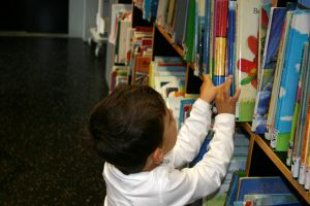
A small child reaching for books on a shelf
(Stock image by bies from stock.xching, sxu licence)

What does "accessibility" really mean? Is it just for disabled people?

Actually, no. "Accessibility" means the ability to access something. It means making something easy to use. This benefits everyone.

Whenever you have trouble understanding or using a program or device, you're encountering a lack of accessibility. This often comes down to the way the app or device is controlled and presented. Accessibility is simply good design.

Disabled people are particularly aware of this, because they have more difficulty in certain areas. For example, someone with visual difficulties may need a larger font, or a coloured background. Someone without those difficulties will still have trouble reading small print on a reflective background. Everyone reads more effectively with fewer distractions.

It Just Works

When you compare one device or app with another, you're looking for accessibility. You don't want to have to learn a lot of new stuff. You don't want something that makes the task more difficult or complex. You want something that's straightforward and easy to use.

If the device or app doesn't work in some way, then that gets in the way of what you want to do. If it is unreliable, slow or missing things you need, then it's not doing the job. The best apps and devices "just work".

The Right Device

It's really difficult to buy a device online, although customer reviews can help. If this device is different from anything you've used before, is it really going to suit you? It's certainly worth going to where you can see it and try it out.

  • Does it look confusing, or interesting?
  • Does it sit comfortably in your hand?
  • Are the buttons easy to reach and use?
  • Is the screen easy to read?
  • Is the software easy to understand and use?
  • Does it load files and turn pages at the right speed for you?
  • Does it do all the things you need it to do?

Nevermind all the technical details, or how popular it is. The real test is whether this device works the way you want it to work.

Specific Needs

So what suits you, may not suit someone else. This is where detailed accessibility comes in. For example, if someone listens to a lot of audio books, then they definitely need good audio quality and the ability to play audiobooks and/or convert text to speech.

So looking for an e-reader is like looking for the right car. Is there enough room inside? Does it get good mileage? How good is its engine? Is it comfortable for you, and does it have all the things you need?

Just like when you decide to buy a car, you spend some time thinking about what you need, how much you want to spend, and how much each feature is worth to you.

Visibility

A high-quality screen reduces eyestrain and makes it much easier to read. Is it easy to read on this screen? What's it like in artificial light and daylight? Try it out in different situations.

Does the device or e-reading software have a night setting (for low light or reading in the dark)? A high-quality device will also avoid eyestrain by adjusting the backlight/brightness when there is more or less ambient light.

A good screen will reflect less light, and on top of that, anti-glare screen-protectors can make your screen much easier to view in different light conditions.

Different background colours work for different people. You see this in the coloured glasses some people wear for reading. Even if you don't have visual difficulties, you may find you read more easily off a coloured background. (I do best with a yellowish colour, for some reason.) White is actually the worst background colour for reading, because it reflects the most light, distracting and tiring your eyes. Compare reading off a blackboard and a whiteboard.

Although different font sizes were first invented for advertizing, and later sporadically provided to help people with visual difficulties (e.g. Large Print Books), this is a basic feature on computers nowadays. We've all found that different font sizes work better in different situations. Different fonts and sizes also help make things clearer. Like me, you've probably found a "favourite" font, size and type which makes it easier for you to understand what you're reading.

People with visual difficulties have had to find out what helps them read. They may use a "reversed" display (white on black), a specific background colour, a different font size/type, even "special" tools for reading. But the fact is that we all read better with the right screen, background and font size/type. So it's worth finding out what suits you best, then making sure your device/app provides it.

(For reading in your browser, check out the free tool Readability.)

Audio

Whether you want to listen to audiobooks, spoken text, radio or your music library, you need good audio quality on your device. Does it sound good through the internal speakers? How about through headphones? You might want to connect your device to external speakers. Does this particular device deliver the clarity and quality of sound you want?

If you want to listen to spoken text, how good is the Text-to-Speech software? Will it read you the material you want, and do it well enough? Is it easy to manage this feature? Do you want it to read you text messages and email? Can you get ebooks/files for this device which allow Text-to-Speech?

Again, what works for disabled people also helps everyone else. Clearer, higher-quality audio is easier to hear and understand. Wider availability of audiobooks and Text-to-Speech means greater access to our information and entertainment, whether we're having difficulty reading, or whether we're busy driving a car.

Interface

An "intuitive" interface is one that makes sense to you. You can see where all the bits are, and can easily work out what they do. The software should have a QuickStart with illustrations or video. Reading the manual is always a good idea, but you shouldn't have to do that simply to start using the app or device.

A cluttered or complicated interface will be harder to use, and will use up your concentration more quickly. This may be more obvious to disabled people, but everyone does better with a simple, intuitive interface. It doesn't get in the way, it doesn't waste your time hunting for the "right" item, and you can use it more easily and for longer without getting tired.

Controls

On this device, where are the physical buttons, keyboard or other controls? Are they easy to use? Do they fit your fingers well? Is it easy to tell whether you've pressed them? Are they protected from accidental pressing? Is it obvious what they do? Like everything else, buttons should be easy to understand and use.

If the device has a touch-screen (and the associated software), does it work properly and actually make life easier? Some low-quality touch-screens don't react quickly or consistently when you touch them, or they aren't easy to control. (For example, today a friend told me, "My touch-screen scrolls past so quickly, I can't keep up. It won't scroll slowly".)

Does the touch-screen allow you a variety of different controls, e.g. swiping, using two fingers, even pressure-sensitive touch? These extra controls make it easier for you to use the software without an external keyboard or mouse. They also reduce the load on the buttons, which are "moving parts" and wear out faster. New features in applications now require this kind of variable touch control. If you're going for a touchscreen, get a good one with multi-touch.

For reading, what's the most comfortable and easy way for you to turn pages? Reader software for a touchscreen device should allow you to choose where to tap (the left, right, top or bottom of the screen) in order to turn the page. This is a movement you will be making millions of times, so having it in the right position makes a big difference. On a non-touchscreen device, does the software allow you to assign the page-turn function to different buttons, so the button you use is in the best position for you?

The page-turn-press position doesn't just vary between left-handed and right-handed people. (For example, I started using handheld devices principally to read books, so I held them in my (non-dominant) left hand, where I would hold a book. My daughter's first devices were iPods, which she held in her (dominant) right hand, to have finer muscle control of the different functions. Now we both have iPhones, but I hold mine in my left hand and she holds hers in her right hand.) Different people are more comfortable holding devices in different hands, or in different ways. That is why more advanced devices have customizable controls.

Reading View

Does the software display a clean, uncluttered page for you to read?

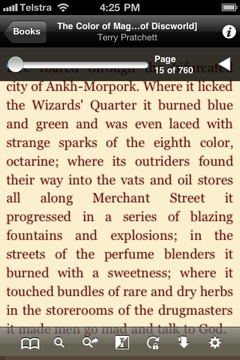
eReader in reading viewBorders reader in reading view

(From left to right: on the iPhone 4, eReader in reading view with my chosen background and font, and Borders reader in night reading view)

For the best reading experience, there shouldn't be anything distracting you or getting in the way. On a touchscreen device, the software should have the option to hide the toolbar and any other information, only bringing it up when you request it.

eReader with toolbar showingBorders reader with toolbar showing

(eReader and Borders reader show toolbars at a touch)

On a non-touchscreen device, any on-screen information should be minimal and unobtrusive. Sure, there are other things you'll do with your reader, like managing your library, transferring books, even buying more books, but none of that should get in the way of the primary reading experience. If it does, you won't find it as easy and comfortable to read.

The software should allow you to to set the background colour and font size/type, as mentioned above and shown in the screenshots, to suit your own personal comfort. It should also allow you to change orientation (portrait or landscape) so you can shift the position of the device in your hand, or view files which look better in landscape. More advanced devices make it very easy and intuitive to do this: simply by turning the device sideways.

Does the software break up pages and chapters at the right point, does it hyphenate words correctly and does it display cover images and links? Can you make notes in your book or document? Can you look up words in a dictionary? These are all basic features which your e-reader should have.

How well does the software display PDF documents? Although PDFs are popular for their portability, they're more like images than text documents, so the e-reading software has to be able to handle the original size of the image. Does it reflow the PDF properly (to fit the screen while keeping a readable font size)? Can you zoom, and scroll sideways if necessary? How easy is it to read these documents?

If you're buying this device principally as an e-reader, reading is the experience you'll want to test most. If possible, borrow the device and read a book on it. Try a newspaper or magazine. Open a few files in different formats. Does it do what you want, and is it comfortable and easy to use? If you can test more than one device, on which one do you enjoy reading more?

Library View

On a handheld device, you also need to be able to find the book you want. Can you sort your library by Author, Title and Date, then go quickly to a particular section? Can you search for a specific book in your on-device Library? Is it easy to pick one title out of the list?

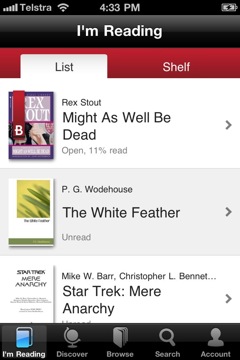
eReader in library viewBorders reader in library view

(eReader and Borders reader in library view)

Some less-developed readers and reading software simply give you a list of titles, with distractingly prominent images and extra information, then leave you to scroll through them. At only a handful of titles per screenful, that's inconvenient and inefficient. A modern reader should make it easy to find, sort and delete titles. More advanced readers should allow you to sort your titles into categories, which helps significantly in finding books and following series.

The device should also show which books have been read. An e-reader has much more capacity than a bookshelf to help you organize your books. If a physical bookshelf would do a better job, then the device isn't good enough.

Other functions

If you want to use your device for other tasks (music, applications, remote control, telephone), the same principles apply. Does it let you do the task without distracting you? Does it have the features you need? Does it provide the quality and clarity you need? It is easy to find and manage information on the device?

No-one else can tell if the device is right for you. Test-drive it with the tasks you plan to do. There is a wide variety of devices and software available, with more being developed all the time. You don't have to put up with less than you really want.

Software

(For reference, "hardware" is something you can touch, while "software" is the instructions the device follows. It's a bit like the difference between your body and your thoughts.)

Firmware

Some e-reading devices require "firmware" upgrades. Firmware is software we don't get to customize, but it often fixes bugs and improves the performance of a previously-released device. The key question is: how painless are the upgrades?

The best situation is where your device has its firmware upgraded during normal syncing. You don't need to do anything differently. A separate firmware upgrade process can be difficult to manage, and it becomes a significant barrier for some users. If you choose to buy a device with separate firmware upgrades, find the one which causes you the least convenience and has the best record of actually fixing things and improving functions.

System

If you want to be able to customize your system, you'll have to look around pretty carefully. Although some devices are running on cut-down Linux systems, most retailers have "locked down" the system for their own use. A locked system isn't necessarily a bad thing, because it does its job without interference. For most users, a locked system can be more reliable, because other people can't mess with your device. However, if you want or need to customize your system for specific functions, you'll need an open Linux system.

Applications

In many cases, an advanced device will handle any specific functions through different applications. For example, the Apple App Store has an impressive range of special-purpose apps. Whatever your interest or task, you're likely to find an app to fulfil it. Android systems also have access to a wide range of applications.

These applications can expand your device in all sorts of directions. So it really depends on what you want to do with it, and if you want that sort of flexibility. I originally bought my iPhone as a combined phone and e-reader, but I've since found it extremely useful for all sorts of other tasks. However, other users may want a dedicated e-reader without extra functions, to get away from other input. What would work best for you?

Files and Transfer

What are you going to want on your device, and how will you get it there? You might read a lot of PDFs, have many different formats of ebooks, or spend most of your time out of range of your desktop computer. You may not even have a desktop computer.

USB, WiFi and 3G

These work well in different situations. USB transfers files directly through a cable between your device and computer. WiFi transfers files through a wireless network. 3G uses the phone data network to transfer files. So, where are you spending your time (and what will data transfer cost you)?

  • USB: right next to your computer (free)
  • WiFi: connected to a wireless network (some free, some cost per time)
  • 3G: connected to a mobile phone tower (cost per data)

The odds are, you're going to spend at least some time away from your computer, and even out of wireless range. Do you want to be able to access files then? How good is the wireless coverage in your area? If you can afford it, having all three of these connection options gives you more flexibility and reliability. Wherever you are, you can get and send data or books.

Using Calibre

Calibre is a free, cross-platform ebook library program. Calibre makes it easy to catalogue your books on your desktop computer, and to convert between ebook formats. It also works directly with quite a few USB-connected e-reading devices, and allows you to access your ebook library over a local network or the Internet.

Does your e-reader connect directly via USB with Calibre? If not, you can still use Calibre's library and conversion functions, but you can't transfer books directly to/from Calibre. This function does make it much easier to manage your on-device library, so it's worth considering when you choose your e-reader. Regardless, you will be able to access your Calibre library over WiFi or 3G.

Networking and Cloud

Do you want to be able to buy/download more books when using your handheld? Some devices can do this, and some can't. Some are locked into a single retailer, while others allow you to buy from different retailers. Being able to shop around is an advantage when you can't get all the books you want from a single retailer, but being locked into a single retailer can be simpler. It's up to you.

Some devices will allow you to transfer books or files directly to another person's handheld. You can also set preferences for different computers and networks. Some devices and e-reader apps now support cloud services like DropBox. This means your device is constantly backed up to the "cloud" (remote computer), which you can access from anywhere. Being able to keep in touch in this way can be very useful if you travel a fair bit, or if you can't afford to lose data from your device.

Backup

Once you pay for your books, music files or other data, and once you've spent time writing emails or working on documents, you don't want to lose them. Unfortunately, this can happen. It's way too easy to lose your handheld device, or for someone to steal it. Even without that, the storage in your device can fail with no warning. So you need a backup.

You can backup using available USB, WiFi and 3G connections. Just like in general networking, the more connections you have available, the more options you have. Automatic, ongoing backups during the day to a cloud service like DropBox or MobileMe mean at the worst, you lose the last few minutes of data.

Each time you connect to your desktop computer, you make a backup on that, too. You might only need to backup once a day, and it doesn't matter if you lose any changes in between. Or you might want to keep track all the time.

Syncing

Syncing (synchronizing) keeps mirror copies of your data in both places. If you have multiple handheld devices, you can sync between them. Good e-reading software also syncs the status of your books, so you can pick up, say your mobile phone and see the same page where you left off on your dedicated e-reader. On well-designed devices, syncing and backup are done at the same time: all you need to do is connect your device.

So you can sync between multiple devices, sync with your desktop computer, and sync with cloud services. This means you have mirror copies of your data in several places (effective backup) which you can access anytime.

Syncing also makes life easier when you buy, add or delete files on one device or computer. As soon as you sync, the change will appear on the other device(s). Older backups also mean you can bring something back if you delete it by accident.

File Types

What kinds of files will you want to access on your device (e.g. books, music, images, movies, documents, webpages, email)? Does this device work with the files you already have? This is an issue with all media, but especially with ebooks. Although ePub is the standard format (which all e-readers should support), retailers lock other software out with DRM, and there are a number of other widely-used formats which don't necessarily work on all platforms.

(For reference, DRM is Digital Rights Management. It's supposed to protect the copyright holders, but in practice just gets in the way of legitimate purchasers reading their books.)

Calibre can convert all the common formats, but not if they have DRM. So you can be stuck with purchased books which don't work on your new device. Again, flexibility is valuable. Look around at the books you want to buy or read, and other files you want to use, then find a device which makes them available to you.

Portability

One of the big selling points for e-readers is that they're portable. You can carry them around in your pocket or bag, and it's much easier than carrying around a stack of paper books, magazines, documents etc.

However, your e-reading device needs to be portable for you. Different people need different sizes and weights of devices: what suits another person may not suit you. The size of your hands, the way you hold books, the way you move around and where you need to use the device are all things you might want to take into consideration.

This comes back to how the device feels in your hand. Is it the right size and weight for you to hold through a long reading session? Are there stands or mounts so you can use it hands-free? Do they work in the situations you'll encounter? Does the device work well hands-free for your purposes?

Some people want to be able to walk around, ride their bike or drive their car while having easy access to their device. Are there useful mounts for these locations? Do they make it easy for you to see, touch or remove the device when necessary? Are there cases or other accessories which protect your device from being bumped, dropped and splashed by rain?

When you're sitting in your favourite chair and reading on your device, can you prop it up and read it easily? Are there arm-mounts or lap-stands which position the device where you want it? Mounts and stands can give you better access in different situations, and be less tiring on your hands in others. For anyone who has difficulty holding a book for any length of time, the right size, shape and weight of ebook will sit comfortably in your hand and place much less strain on it.

Can you prevent the device from slipping off the chair-arm or your lap? When you're carrying around a small device, taking it in and out of pockets or bags and moving it from one position to another, over time it's very likely you'll drop it, or it will slip off or out of something. Is it robust enough to survive a few falls onto a hard surface?

(I found my iPhone had an irresistible urge to dive for the floor at the least opportunity. My daughter installed an ingenious elastic strap which holds it on my chair-arm. You can also get pockets which hang over your chair arm, but having the device on the arm makes it more visible and easier to pick up. A case will protect your device, but a removable case may not be as effective. I found I mostly dropped my device when it was out of its case (and I've been amazed at how many falls onto concrete it's survived). Now I have a case which protects the device while still showing the screen. It's minimal but effective when combined with a screen protector, and it makes the device easier to grip.)

A device is only truly portable if it can keep on working when you need it. How long does the battery last, under different conditions? How can you reduce the load on the battery, when you need it to last longer (e.g. turn off extra features)? How does the device charge?

Handheld devices usually charge via USB (the sync cable) and/or AC (plugged into the wall). Having both options is better, and you can also get wall plugs which let you plug in your USB cable. (Then you only have to carry your USB cable with you, not a bulky adapter.) You can also get car chargers which accept USB cables, solar chargers with a range of plugs, and extra battery packs which attach to your device. These options are important if you're on the go all day, or if you're away from mains electricity.

Conclusion

People buy e-readers (and other electronic devices) when they're easy to use and good value for money. Recent price cuts have made e-readers more competitive, but successful devices are the most accessible ones. You buy a device, use it and keep on using it when it's easy to understand and does the things you want.

Each person's situation is different. Truly accessible devices adapt to your needs.


Further resources